


Supermicro IPMI Explained: Manage Root Servers Remotely
Supermicro IPMI: Manage Your Root Server Remotely at Any Time
Reliable remote access is essential when operating a dedicated root server. For this reason, our Supermicro servers are generally equipped with a separate management interface: the IPMI or BMC interface.
This web-based administration interface allows you to use important server functions remotely, even if the installed operating system is no longer accessible. This gives you greater control and enables you to perform many administrative tasks independently.
What Is Supermicro IPMI?
IPMI stands for Intelligent Platform Management Interface. It is a standard for remotely managing and monitoring server hardware.
The Baseboard Management Controller, or BMC, is integrated directly into the server motherboard and operates largely independently of the installed operating system.
This means that the IPMI interface may still be accessible even if Windows or Linux is no longer responding, SSH or Remote Desktop is unavailable, or no operating system has been installed yet.
Access is usually provided through a dedicated IP address and an encrypted web interface.
Powering the Server On and Off
The IPMI interface allows you to check the current server status and perform various power-control actions:
-
Power on the server
-
Power off the server
-
Restart the server
-
Perform a power cycle
A power cycle completely switches the server off and then powers it on again. This can be useful when the operating system is no longer responding.
An immediate shutdown should only be used in an emergency, as it is comparable to disconnecting the server from its power source and may result in data loss.
Remote Console for Screen, Keyboard and Mouse
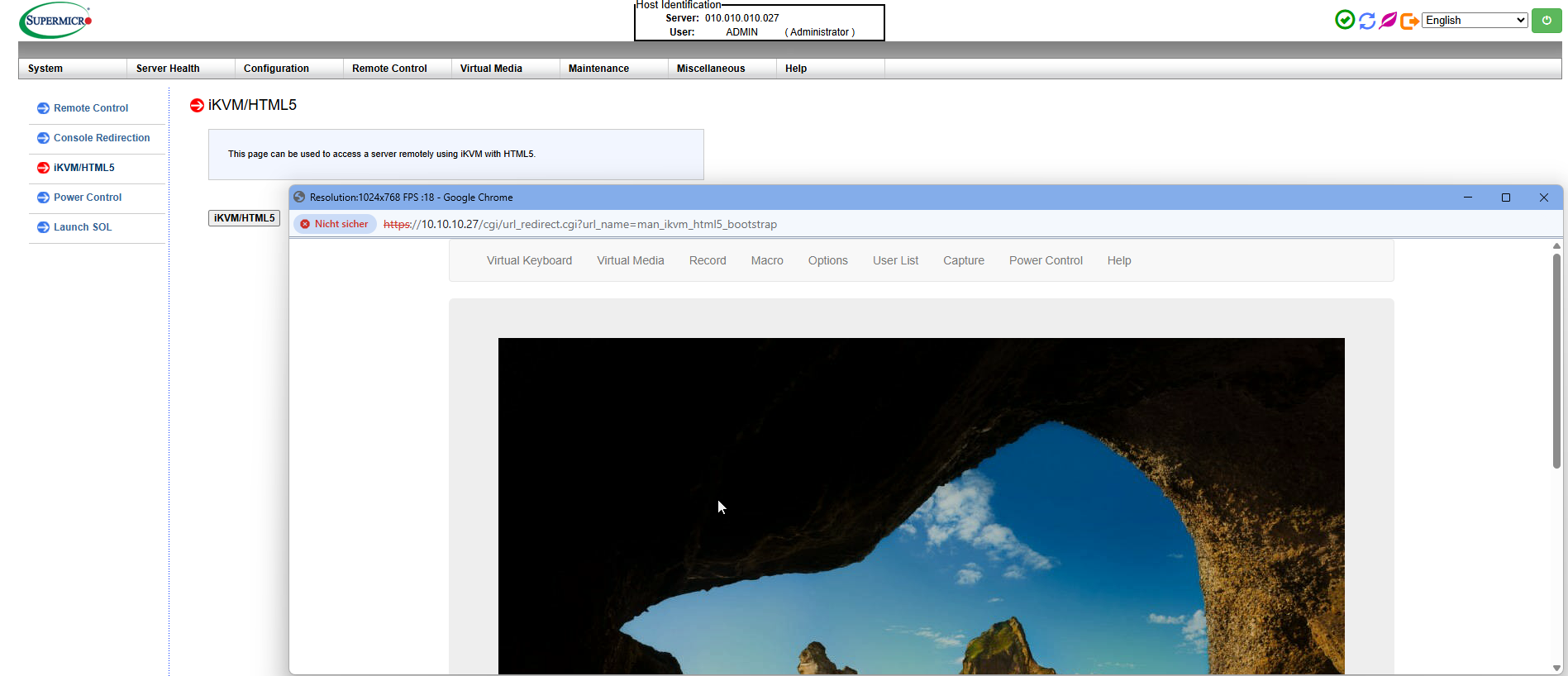
One of the most important Supermicro IPMI functions is the integrated KVM remote console.
KVM stands for:
-
Keyboard
-
Video
-
Mouse
The remote console displays the server screen as though you were physically standing in front of the machine. It also allows you to transmit keyboard and mouse input.
Depending on the Supermicro platform, an HTML5-based or Java-based console may be available.
The remote console can be used for:
-
Accessing the BIOS or UEFI
-
Monitoring the complete boot process
-
Selecting a boot device
-
Editing bootloader settings
-
Troubleshooting startup problems
-
Installing an operating system
-
Accessing the server when SSH or RDP is unavailable
When normal network access is no longer working, the IPMI console provides an important alternative access method.
Installing an Operating System via Virtual Media
The Virtual Media function allows you to connect an ISO file to the server as a virtual CD or DVD drive.
This can be used to install operating systems and virtualization platforms such as:
-
Ubuntu Server
-
Debian
-
Rocky Linux
-
AlmaLinux
-
Microsoft Windows Server
-
VMware ESXi
-
Proxmox VE
After mounting the ISO file, the server can be booted from the virtual installation medium through the remote console.
A detailed step-by-step guide is available in the menkiSys knowledge base:
IPMI ISO Mount Guide – Remote Installation on Dedicated Root Servers
Transfer speed depends on your internet connection, the connection to the data center and the BMC generation used. Large ISO files may therefore take longer to transfer than locally connected installation media.
Monitoring Hardware Status and Sensor Values
The BMC monitors various hardware components and displays their sensor values in the IPMI interface.
Depending on the server model, the following information may be available:
-
CPU and motherboard temperatures
-
Fan speeds
-
Operating voltages
-
Power supply status
-
Power consumption
-
System and hardware warnings
The sensor overview helps identify unusual temperatures, failed fans or power supply problems at an early stage.
The available information depends on the Supermicro platform, motherboard, chassis and installed components.
Reviewing the System Event Log
The System Event Log, or SEL, records important hardware events detected by the BMC.
These may include:
-
Critical temperature values
-
Failed or slow-running fans
-
Power supply problems
-
Voltage fluctuations
-
Memory errors
-
Unexpected server restarts
-
General hardware warnings
The event log is especially useful when a server has restarted unexpectedly or when a hardware issue cannot be reproduced immediately.
Providing relevant event-log entries with a support request can significantly accelerate technical analysis.
Restarting the BMC Without Restarting the Server
The BMC is an independent management system. In rare cases, the IPMI web interface or remote console may stop responding correctly.
Depending on the platform, a BMC reset can then be performed. This restarts only the management controller. The root server itself and the installed operating system normally remain operational.
During the BMC reset, the IPMI interface may be unavailable for several minutes.
IPMI Works Independently of the Operating System
The main advantage of out-of-band management is that IPMI does not depend on the installed operating system.
Access may still be possible when:
-
The operating system network configuration is incorrect
-
A firewall blocks normal server access
-
SSH or Remote Desktop is unavailable
-
The operating system freezes during startup
-
A kernel or driver problem occurs
-
No operating system has been installed
However, IPMI does not replace regular server administration. Updates, firewall rules, user accounts, backups and applications must still be managed within the operating system.
Securing IPMI Access
Because the IPMI interface provides extensive control over the server, the access credentials must be protected carefully.
Recommended security measures include:
-
Use a unique and strong password.
-
Store the password in a secure password manager.
-
Do not share the credentials with unauthorized persons.
-
Log out after using the interface.
-
Access IPMI only from trusted devices and networks.
-
Change compromised credentials immediately.
Depending on the root server package, access may also be protected through a dedicated management network, firewall rules or a VPN connection.
When Should You Contact menkiSys Support?
Contact our support team particularly when:
-
The BMC network is not reachable
-
The server does not start after a power cycle
-
A hardware error has been recorded
-
A power supply, fan or storage device has failed
-
The remote console permanently displays no image
-
Physical intervention on the server is required
Please provide a detailed error description, the approximate time of the issue and any relevant entries from the System Event Log.
Greater Control Over Your Root Server
Supermicro IPMI provides powerful remote access to your root server independently of the installed operating system.
You can restart the server, monitor the boot process, access BIOS settings, mount ISO files and review important hardware values. Many issues can therefore be analyzed independently, while administrative tasks can be performed remotely and flexibly.
For menkiSys Supermicro root servers, IPMI is therefore an essential component of professional and transparent server management.
Frequently Asked Questions About Supermicro IPMI
Can I restart my root server through IPMI?
Yes. The power-control functions allow you to restart, shut down, power on or power-cycle the server.
Does IPMI work if Linux or Windows is unavailable?
In many cases, yes. The BMC operates independently of the operating system. The management interface must still be powered and reachable over the network.
Can I install an operating system through IPMI?
Yes. Virtual Media allows you to mount an ISO file and perform the installation through the remote console.
Can I access the BIOS through IPMI?
Yes. The remote console is available during the boot process and allows access to the BIOS or UEFI.
Does a BMC reset restart the entire server?
Normally, no. A BMC reset restarts only the management controller. The operating system usually remains operational.
Is IPMI the same as SSH or Remote Desktop?
No. SSH and Remote Desktop operate within the installed operating system. IPMI is a separate hardware-management interface.
Are all IPMI functions identical on every Supermicro server?
No. Available functions depend on the server generation, motherboard, BMC firmware, configuration and applicable licences.