


Supermicro IPMI Management: Guide for X10 and X11 Mainboards
Supermicro IPMI Management: Guide for X10 and X11 Mainboards
Supermicro IPMI is a central management interface for professional server systems. Especially on Supermicro X10 and X11 mainboards, IPMI enables remote server administration independently of the installed operating system. Through the IPMI web interface, administrators can monitor the server, restart it, power it on or off, check sensor data and access the BIOS, boot menu or operating system directly via the remote console.
At menkiSys, we use Supermicro server systems in professional data center operations. Many of our dedicated root servers are based on proven Supermicro enterprise hardware with IPMI remote management. This guide explains the most important functions after logging into the Supermicro IPMI web interface.
What is Supermicro IPMI?
IPMI stands for Intelligent Platform Management Interface. It is an independent management function integrated into the server mainboard. IPMI operates independently of the installed operating system and remains accessible even if Windows Server, Linux, VMware ESXi, Proxmox or another hypervisor is no longer responding.
With Supermicro IPMI, you can perform tasks such as:
Server power on and power off
Server restart
Hardware sensor monitoring
CPU, RAM, fan and temperature checks
Opening the remote console
Changing BIOS settings remotely
Mounting ISO files virtually
Installing operating systems remotely
Reading system event logs
Analyzing hardware issues
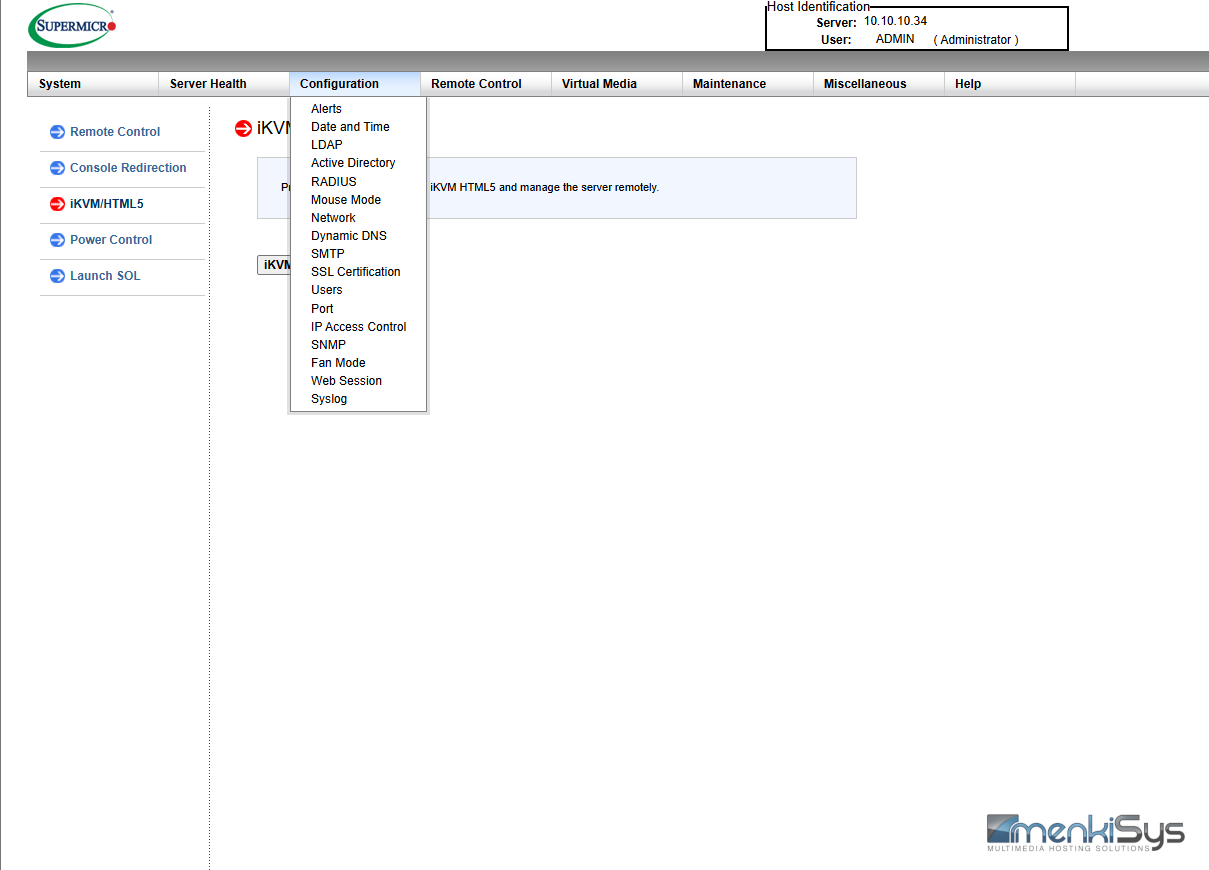
This makes Supermicro IPMI an essential tool for administrators, hosting customers and IT service providers who operate dedicated servers professionally.
Login to the Supermicro IPMI Web Interface
After opening the IPMI address in a browser, the Supermicro IPMI login screen appears. Depending on the mainboard generation and firmware version, the interface may look slightly different. However, Supermicro X10 and X11 mainboards generally provide very similar functions.
After successful login, you will see the dashboard or system overview. This section displays basic information about the server, such as:
Mainboard model
BIOS version
IPMI firmware version
BMC IP address
System status
Sensor status
Power supply status
Fan status
For production servers, the first step after login should be to check whether any critical warnings or errors are displayed.
Checking System Status and Sensors
One of the most important areas in Supermicro IPMI is hardware monitoring. Under menu items such as Server Health, Sensor Readings or System Health, you can check the current sensor values of the server.
Typical sensor values include:
CPU temperature
Mainboard temperature
RAM status
Fan speeds
Power supply status
Voltage values
Chassis and ambient temperature
If a sensor is marked red or shows a critical value, the server should be checked immediately. CPU temperature, fan status and power supply status are especially important. A defective fan, a failed power supply or excessive temperature can cause long-term hardware issues.
At menkiSys, server systems are additionally monitored within our data center infrastructure. Nevertheless, IPMI gives customers a very useful interface for their own control and diagnostics.
Powering Servers On and Off via IPMI
Through the Power Control or Remote Control / Power Control section, you can control the server remotely.
Typical options include:
Power On
Turns the server on if it is currently powered off.
Power Off
Performs a hard power-off. This is similar to holding down the physical power button. This option should only be used if the operating system no longer responds.
Graceful Shutdown
Sends a clean shutdown request to the operating system. This option should be preferred if the operating system is still responding.
Reset Server
Performs a hard reboot of the server. This should only be used if a normal restart is no longer possible.
Power Cycle
Turns the server off and then back on again. This option is useful if a server is completely frozen and a simple reset is not sufficient.
From a technical point of view, a clean restart through the operating system should always be attempted first. IPMI power functions are primarily intended for maintenance, emergency access and remote recovery.
Opening the Remote Console
One of the most important Supermicro IPMI features is the remote console. The remote console gives you direct access to the server screen, similar to standing in front of the server with a monitor and keyboard.
Depending on the IPMI version, different console options may be available:
Java iKVM Console
HTML5 Console
Remote Console via IPMIView
KVM-over-IP access
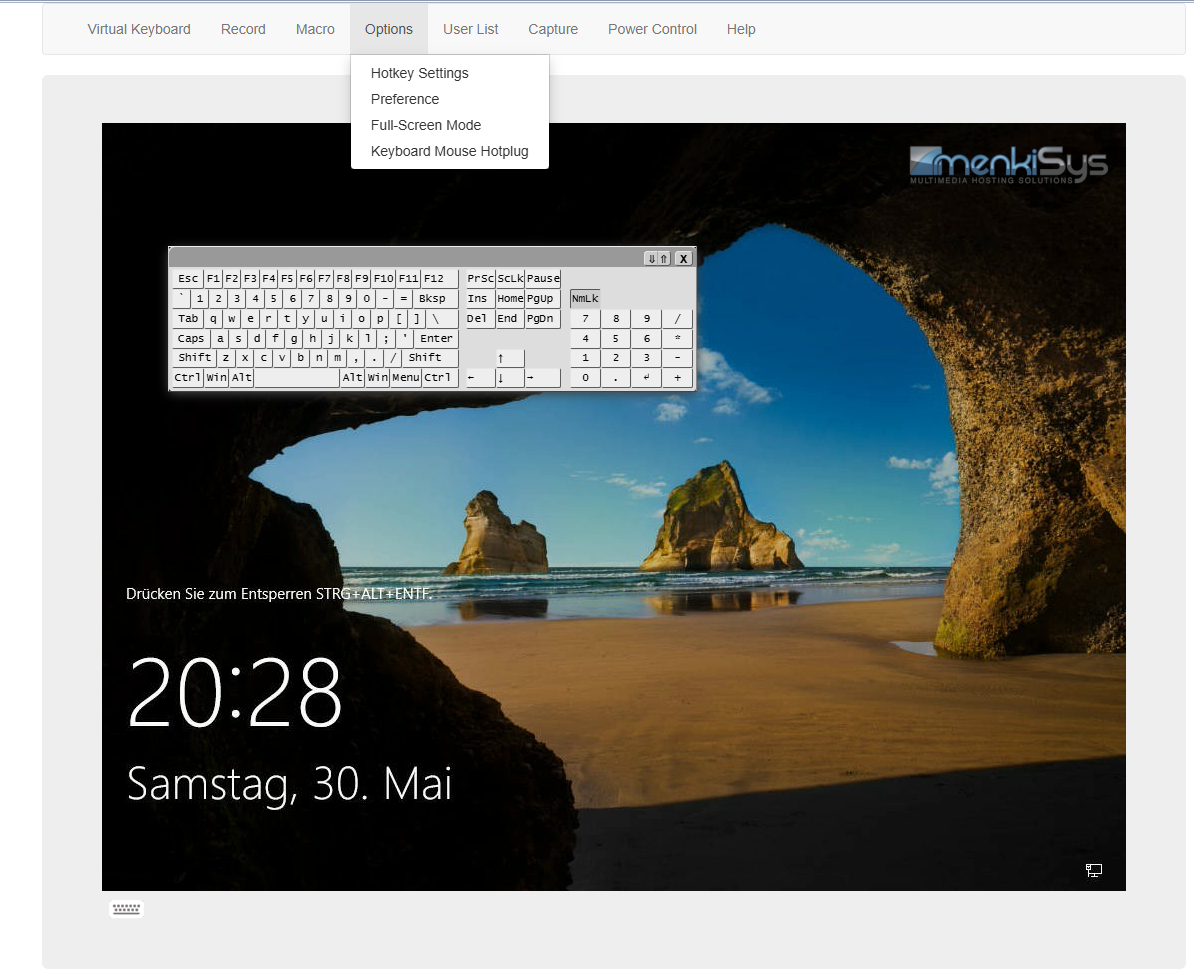
Older X10 mainboards often still require Java. Many X11 systems already provide an HTML5 console if the IPMI firmware is sufficiently up to date.
With the remote console, you can:
Open the BIOS
Use the boot menu
Configure RAID controllers
Install operating systems
View boot error messages
Repair a server when SSH or RDP is unavailable
Operate Windows Server, Linux, Proxmox or VMware ESXi directly
Especially for dedicated root servers, the IPMI remote console is a major advantage because it works independently of the operating system network services.
Opening the BIOS via Supermicro IPMI
To open the BIOS of a Supermicro server remotely, restart the server and open the remote console. During the boot process, press the required key, usually:
DEL for BIOS setup
F11 for the boot menu
F12 for network boot, depending on system configuration
In the BIOS, important server settings can be adjusted, for example:
Boot order
Virtualization technologies such as Intel VT-x or VT-d
CPU settings
RAM configuration
PCIe options
Onboard components
Power management
IPMI network settings
BIOS changes should only be performed by experienced administrators. Incorrect settings can prevent the server from booting correctly.
Mounting ISO Files via IPMI
Supermicro IPMI allows ISO files to be mounted virtually. This makes it possible to install an operating system remotely without physical access to the server.
Typical use cases include:
Windows Server installation
Ubuntu Server installation
Debian installation
Rocky Linux installation
Proxmox VE installation
VMware ESXi installation
Booting a rescue system
Booting RAID or firmware tools
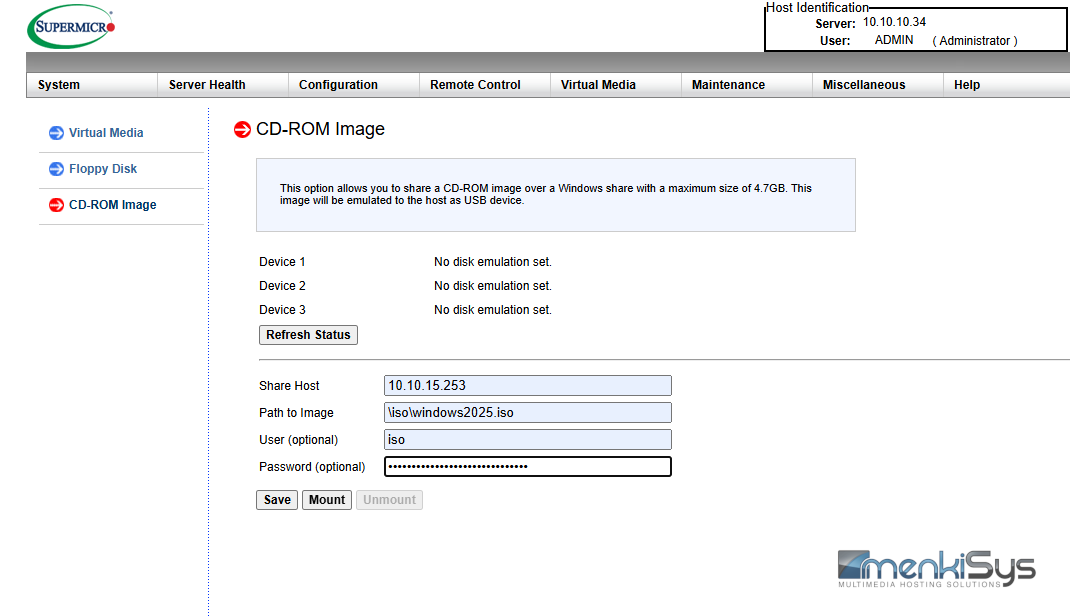
The ISO is mounted through the remote console as a virtual CD/DVD drive. The server can then be booted from the virtual media. This function is especially valuable for remote installations and server recovery.
For larger ISO files, a stable connection is important. An interrupted connection during installation can lead to installation errors.
Checking the System Event Log
The System Event Log, often referred to as SEL, is an important diagnostic section in Supermicro IPMI. It records hardware-related events from the server.
Typical entries in the System Event Log include:
Temperature warnings
Fan errors
Power supply errors
RAM errors
CPU warnings
Chassis intrusion events
Voltage issues
Critical system events
If a server restarts unexpectedly or shows hardware problems, the System Event Log should be checked. It often provides clear indications of the root cause.
For recurring errors, the log should not simply be deleted before the cause has been documented and analyzed.
User Management in Supermicro IPMI
In the User Management section, IPMI users can be managed. Passwords can be changed, new users can be created and access rights can be assigned.
Recommendations for IPMI user management:
Change default passwords immediately
Use strong passwords
Disable unused users
Avoid shared administrator accounts
Grant access only to authorized persons
Never expose IPMI unprotected to the public internet
IPMI is a very powerful administration interface. Anyone with IPMI access can fully control the server. For this reason, access must be protected accordingly.
Security for Supermicro IPMI
Supermicro IPMI should generally not be directly accessible from the public internet. The better approach is access through a protected management network, VPN or dedicated firewall rules.
At menkiSys, access to IPMI systems is provided through secured management structures. This prevents sensitive management interfaces from being exposed directly to the internet.
Important security measures include:
IPMI access only via VPN
Strong passwords
Regular firmware updates
Access restrictions by IP address
No default login credentials
Active log monitoring
No IPMI access in the public customer network
An unsecured IPMI interface is a serious security risk. A properly secured IPMI interface, however, is an extremely valuable tool for professional server management.
Firmware and BIOS Updates
Supermicro X10 and X11 mainboards can partially receive firmware updates via IPMI. This primarily includes IPMI/BMC firmware and, depending on the system, BIOS updates as well.
Firmware updates should only be performed when there is a specific reason, such as:
Security update
Compatibility issue
Bug fix
Remote console malfunction
Required new functionality
Hardware not being detected correctly
A failed BIOS or IPMI update can make the server unusable or require manual intervention. Therefore, such updates should always be planned and carried out within an appropriate maintenance window.
Typical Problems and Solutions
Remote Console does not start
On older Supermicro X10 systems, this is often caused by Java or browser compatibility issues. In this case, IPMIView or another browser may help.
HTML5 console is missing
Many older IPMI versions do not support an HTML5 console. An IPMI firmware update may help if the mainboard supports it.
Server no longer responds
First, try a graceful shutdown. If this does not work, a reset or power cycle through IPMI may be required.
ISO does not boot
Check the boot order in the BIOS or use the boot menu during startup via F11.
IPMI is not reachable
Possible causes include an incorrect IP address, wrong VLAN configuration, firewall rules, network cable issues, a disabled IPMI port or a problem in the management network.
Sensors show critical values
Check temperature, fans, power supplies and airflow. Critical values should not be ignored.
Advantages of Supermicro IPMI for Dedicated Servers
Supermicro IPMI provides significant advantages in professional hosting environments. Especially for dedicated servers, root servers and virtualization servers, IPMI is a key factor for operational reliability and fast troubleshooting.
The most important advantages include:
Complete remote management
Independent of the operating system
Access to BIOS and boot menu
Remote operating system installation
Real-time hardware monitoring
Fast recovery during system problems
Fewer on-site interventions
Professional server management
For menkiSys customers, this means more control, better diagnostic capabilities and a professional management interface at enterprise level.
Supermicro IPMI on menkiSys Root Servers
menkiSys uses professional server hardware in its own Austrian data center. Many of our dedicated root servers are based on Supermicro platforms with IPMI remote management. This gives customers a powerful and secure management option for their server.
Our dedicated servers are ideal for:
Web hosting
Virtualization
Proxmox VE
VMware ESXi
Hyper-V
Linux servers
Windows servers
Databases
Backup servers
Private cloud
GPU and AI workloads
Enterprise applications
By using Supermicro IPMI, servers can be efficiently managed, monitored and recovered remotely in case of an emergency.
Conclusion: Supermicro IPMI is Essential for Professional Server Management
Supermicro IPMI is one of the most important features of modern enterprise servers. Especially on Supermicro X10 and X11 mainboards, IPMI provides a reliable foundation for remote management, hardware monitoring and server recovery.
Anyone operating dedicated servers professionally should not view IPMI as an optional feature, but as an essential tool in daily server operations. With IPMI, servers can still be managed even when the operating system is no longer reachable.
menkiSys offers dedicated servers and root servers with professional enterprise hardware, secure network connectivity and operation in our own Austrian data center. Supermicro IPMI is an important component for reliable remote maintenance, fast diagnostics and maximum operational control.
« Back